Accounting

From payment to accounting, in one system.

NuPay is a full double-entry accounting suite built around how schools work, with accrual and cash accounting both supported. Every fee, payment and expense posts to the ledger automatically, so experienced accountants get the records they expect and everyone else gets books that keep themselves.

  • Double-entry, with accrual or cash accounting
  • Chart of accounts, journals, ledger, trial balance and 30+ reports
  • Built for accountants. Usable by anyone.
Who it’s for

Real accounting, whether or not you’re an accountant

Underneath, NuPay is strict double-entry accounting. On the surface, most of the bookkeeping has already been done for you.

For experienced accountants

Everything you’d expect, nothing dumbed down

  • A full chart of accounts with assets, liabilities, equity, income and expenses
  • Double-entry journals you can post, review and trace to source documents
  • Accrual or cash basis, with the general ledger, trial balance, P&L, balance sheet and cash flow statement
  • Bank reconciliation, AR aging, multi-currency at historical rates and a full audit trail
For bursars, heads and admin staff

You don’t need to know what a credit is

  • Send invoices, record payments and capture bills in plain language
  • NuPay works out the debits and credits and posts the journal for you
  • Balances, statements and reports update on their own
  • Your accountant or auditor sees proper books, not a spreadsheet
Accounting methods

Double-entry at the core. Accrual or cash, your choice.

NuPay keeps the books the way an auditor expects them kept, and lets you report on the basis your school uses.

What’s included

Everything an accountant looks for

The accounting engine is the same in NuPay Start, Pro and Complete. Budgeting is added in Pro and Complete, and institution-wide controls in Complete.

Core ledger

  • Chart of accounts set up for schools, with assets, liabilities, equity, income and expenses
  • General ledger with every transaction, verified as it posts
  • Journal entries: manual and automated, each traceable to its source
  • Trial balance that always balances
  • Account transactions report for any account, for any period
  • Period close with reconciled balances and reports ready

Receivables

  • Student invoices for fees, levies, trips and exam charges
  • Accounts receivable by student, class and term
  • AR aging summary, so you know who owes what and for how long
  • Fee allocation of full, part and overpayments
  • Student credits for anything paid above what is owed
  • Fees statements and invoice reports

Payables and expenses

  • Bills from vendors, with what is paid and what is still due
  • Bank expenses and cash purchases captured in one place
  • Each expense tied to a vendor, expense account and department
  • Expenses categorised automatically from the bank feed
  • Expense details and expenses reports

Bank and cash

  • Live bank feeds from the school’s bank account
  • Bank reconciliation handled by AutoReconcile
  • Online payments, bank deposits, cash and swipe all in the same books
  • Interbank transfers between the school’s accounts
  • Bank balance and book balance side by side

Multi-currency

  • Invoice, receive and pay in USD and ZWG
  • Each transaction kept at its historical rate
  • Accounts in different currencies side by side
  • Reports filtered by currency

Budgeting

  • Annual, termly and departmental budgets
  • Start from last year’s actuals, copy a budget or begin from blank
  • Budget vs actual tracked automatically as money moves
  • Variance by department, account and category
  • Pro & Complete

Financial reports

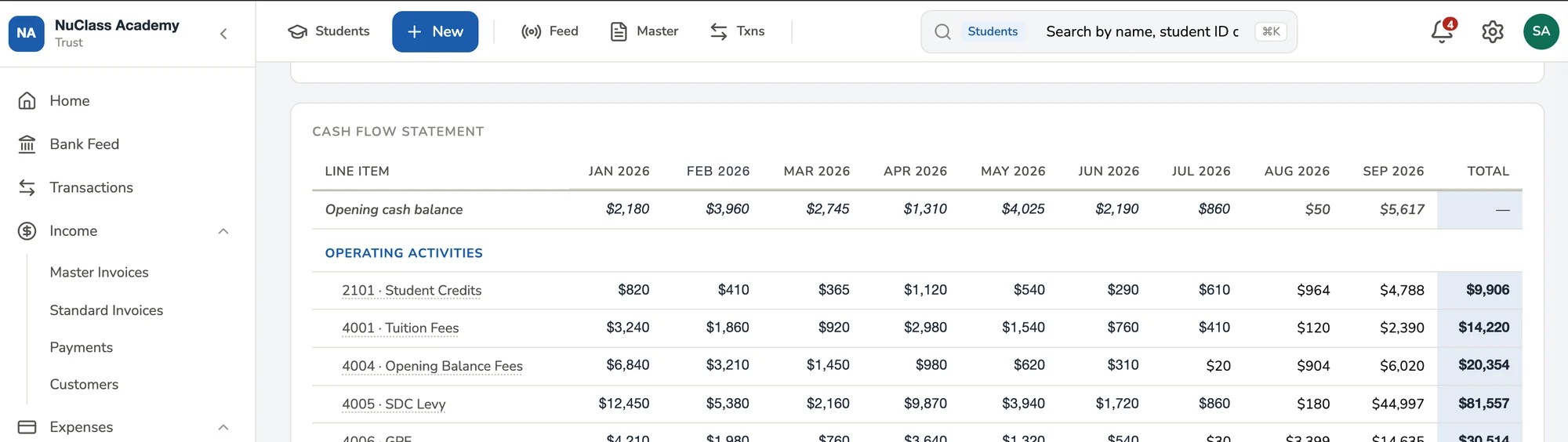
  • Profit & loss, balance sheet and cash flow statement
  • General ledger, trial balance and journal report
  • AR aging summary, fees statement and invoice reports
  • Budget vs actuals, interbank transfers and activity & audit trail
  • 30+ reports in all, generated from the live ledger
  • Filter by period, department and currency, and export for the board or the auditors

Controls

  • Full audit trail: every invoice, payment and change, with who did it and when
  • Role-based access for bursars, accountants, heads and clerks
  • Departments, so income and spending can be tracked by area
  • Multiple departments or funds, inter-fund accounting and consolidated reporting on NuPay Complete
Chart of accounts

A chart of accounts that already speaks school

Tuition, levies, exam fees, student credits and the accounts your school actually uses, ready on day one.

  • Assets, liabilities, equity, income and expenses, laid out the way an auditor expects.
  • Income accounts for tuition, levies, trips and exam charges, so fee income is reported by type.
  • A bank account in the ledger for every real bank account, plus petty cash.
  • Add the accounts your school needs, and track each one by department.
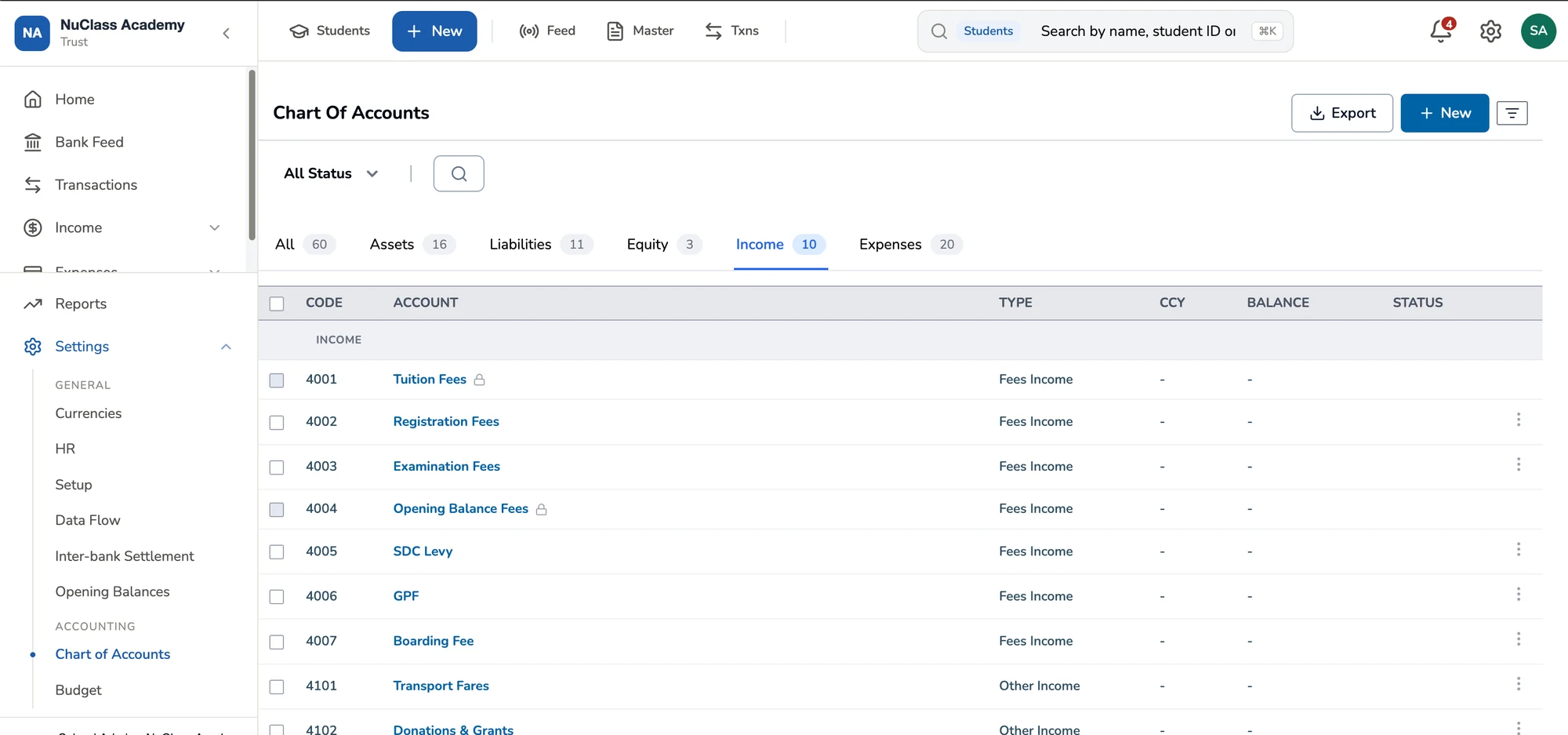
NuPay Chart of Accounts screen filtered to income accounts: tuition fees, registration fees, examination fees, SDC levy, GPF, boarding fee, transport fares, and donations and grants.
The chart of accounts in NuPay, here showing a school’s income accounts.
Automation

Double-entry, without the double work

You do the everyday task. NuPay does the accounting behind it.

You do thisNuPay does this
Send a term’s fee invoicesPosts the receivable and recognises the income for the right period
A parent pays by EcoCash or at the bankMatches the payment to the student and invoice, debits the bank, credits receivables
Capture a bill or a cash purchasePosts the expense to the right account and department, with the vendor attached
Nothing: the bank feed runs on its ownCategorises expenses, reconciles the bank and keeps the books in step
Open the month-end reportsFinds the trial balance, P&L, balance sheet and cash flow already up to date

Prefer to post a journal yourself? You can. Every automated entry can be reviewed, and manual journals sit alongside them in the same ledger.

Connected

Every transaction. Accounted for.

Money comes in from everywhere, NuPay understands it, and every financial module uses the same data.

  • Keep your general ledger impeccable with automated double-entry verification.
  • Keep every transaction connected to the student, invoice, vendor, department and bank account it came from.
  • Close your books with confidence, with reconciled balances, audit trails and financial reports always ready.
Budgeting

Plan every dollar. Track every outcome.

Included with NuPay Pro and NuPay Complete. See budgeting in full

  • Build annual, termly and departmental budgets around how your school actually operates.
  • Track Budget vs Actual automatically as expenses and income flow through NuPay.
  • Spot overspending early and see which departments, accounts and categories are driving the variance.
Reports

30+ financial reports, straight from the ledger

From student fee balances and cash flow to Profit & Loss, Balance Sheet and General Ledger: accurate, current and ready when you need them. See all reports

Statements

  • Profit & Loss
  • Balance Sheet
  • Cash Flow Statement
  • Trial Balance

Ledger

  • General Ledger
  • Journal Report
  • Account Transactions
  • Activity & Audit Trail

Fees and students

  • Fees Statement
  • Fees Balances
  • AR Aging Summary
  • Invoice Reports
  • Students Credits

Spending and planning

  • Expenses Report
  • Expense Details
  • Budget vs Actuals
  • Interbank Transfers

Plus 20+ more on NuPay Pro and Complete. Filter any report by period, department and currency, and export it for the board, the auditors or the bursar.

NuPay Cash Flow Statement by month from January to September 2026: opening cash balance, then operating activities by account including tuition fees and SDC levy.
The Cash Flow Statement in NuPay, month by month, built from the ledger.
  • Fees Balances
  • Budget Vs Actuals
  • Balance Sheet
  • AR Aging Summary
  • Students Credits
  • General Ledger
  • Account Transactions
  • Profit and loss
  • Activity logs and Audit Trail
  • Expense Details
  • Journal Report
  • Interbank Transfers Reports
  • Trial Balance
  • Cash Flow Statement
  • +30 more reports

FAQs

Is NuPay double-entry accounting?

Yes. Every transaction posts a balanced journal with a debit and a credit, verified automatically. The ledger, trial balance and financial statements are all produced from it.

Does NuPay support accrual and cash accounting?

Yes. NuPay supports both. With accrual accounting, fees are recognised when invoiced and expenses when incurred. With cash accounting, income and expenses are recognised when the money moves.

Do we need accounting knowledge to use NuPay?

Not for everyday tasks. Staff send invoices, record payments and capture bills in plain language, and NuPay posts the journals behind them. Experienced accountants still get a full chart of accounts, journals, ledger and reports.

Does NuPay replace traditional bookkeeping software?

NuPay includes core accounting capabilities such as automated bank feeds, automated bookkeeping, income and expense management, journals, financial statements and reconciliation. It is designed specifically around the financial workflows of schools.

Can we post manual journal entries?

Yes. Manual journals sit alongside the automated ones in the same ledger, and every entry is traceable to its source.

Is accounting included in every plan?

Yes. Automated bank feeds, automated bookkeeping, income and expenses, journal entries, the general ledger, accounts receivable, bank reconciliation and multi-currency accounting are in NuPay Start, Pro and Complete. Budgeting is included in Pro and Complete.

Is there an audit trail?

Yes. Every invoice, payment and change is recorded with who did it and when, and the Activity & Audit Trail report shows it all.

School accounting that keeps itself

See a payment travel from the parent’s phone to the trial balance, without anyone re-typing it.