Financial Reports

30+ financial reports. One clear view of your school finances.

From student fee balances and cash flow to Profit & Loss, Balance Sheet and General Ledger, NuPay gives your finance team the reports they need: accurate, current and ready when you need them. Nothing is compiled, because every report reads the live ledger.

  • Statements, ledger, fees, spending and banking reports
  • Filter by period, department and currency; accrual or cash basis
  • Drill from any figure to the entries behind it, and export to CSV
The report library

A report for every question a school asks about money

Grouped the way a finance office thinks: the statements, the ledger behind them, the fees, the spending and the banking.

Statements

  • Profit & LossIncome and expenses by account, on an accrual or cash basis, with collapsible groups and drill-down.
  • Balance SheetAssets, liabilities and equity as at any date, with retained and current-year earnings split.
  • Cash Flow StatementOperating, investing and financing cash, plus transfers between accounts.
  • Trial BalanceEvery account’s debit and credit totals as at a date, with zero-balance accounts on or off.

Ledger

  • General LedgerEvery posting, line by line, by period, account and type, with live search and drill-down.
  • Journal EntriesThe entry behind every publish, payment, correction, void and recognition.
  • Account TransactionsEverything that touched one account in a period.
  • Activity & Audit TrailEvery action, with who did it, when, and exactly what changed.

Fees and students

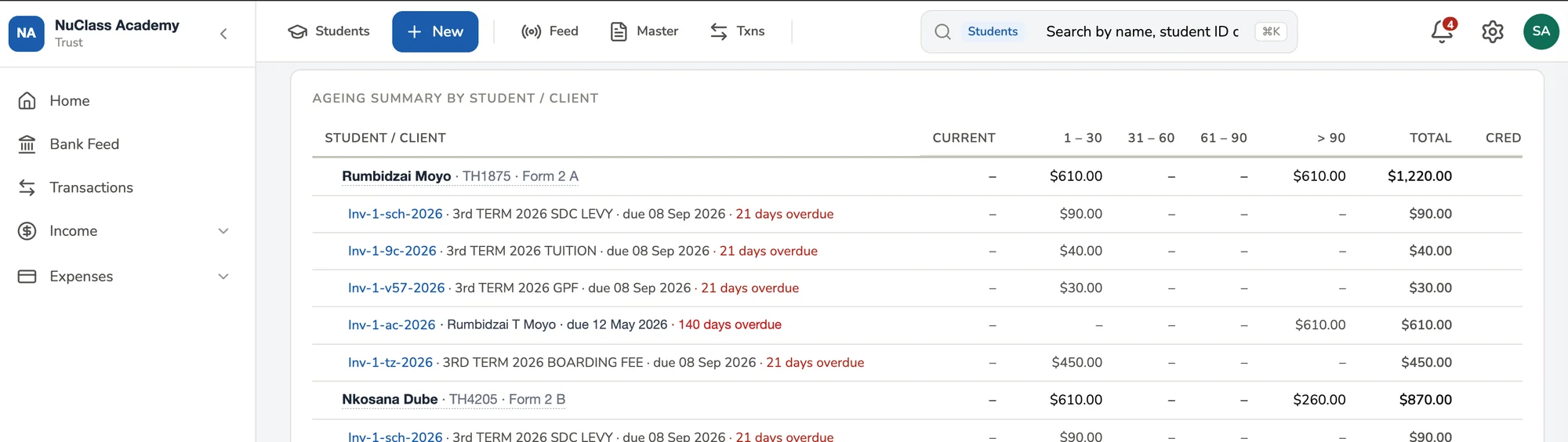
  • A/R Ageing SummaryWho owes what and how late it is: Current, 1–30, 31–60, 61–90 and 90+ days, reconciled to the ledger.
  • Fees StatementOne student’s full account: invoiced, paid, credits and balance due, as a dated running list.
  • Fees BalancesOutstanding balances across students, by class, term and department.
  • Invoice ReportsHow each charge is collecting: invoiced, paid, outstanding and percent collected.
  • Student CreditsCredits created by overpayments and where they were applied, reconciled to the credits account.

Spending and planning

  • Expenses ReportWhat the school spent, by expense account and department.
  • Expense DetailsEvery bill, bank expense and cash purchase, with its vendor and account.
  • Budget vs ActualsPlanned against actual for every income and expense line, with the variance flagged.
  • Vendor StatementBills and payments for one vendor, with what is still owed.

Banking

  • Payments RegisterEvery payment received, by cash, undeposited funds, credits and online.
  • Interbank TransfersFees paid into a different account from the one on the invoice, and what to move between accounts.
  • Bank ReconciliationBank balance against book balance for each account, with what is reconciled and what is waiting.

NuPay Start includes the essential reports. NuPay Pro and Complete add Budget vs Actuals, Journal Entries, Activity & Audit Trail, Interbank Transfers and 20+ more. Compare plans

On every report

Slice it by period, department or currency

The same handful of filters work across the whole library, so once you know one report you know them all.

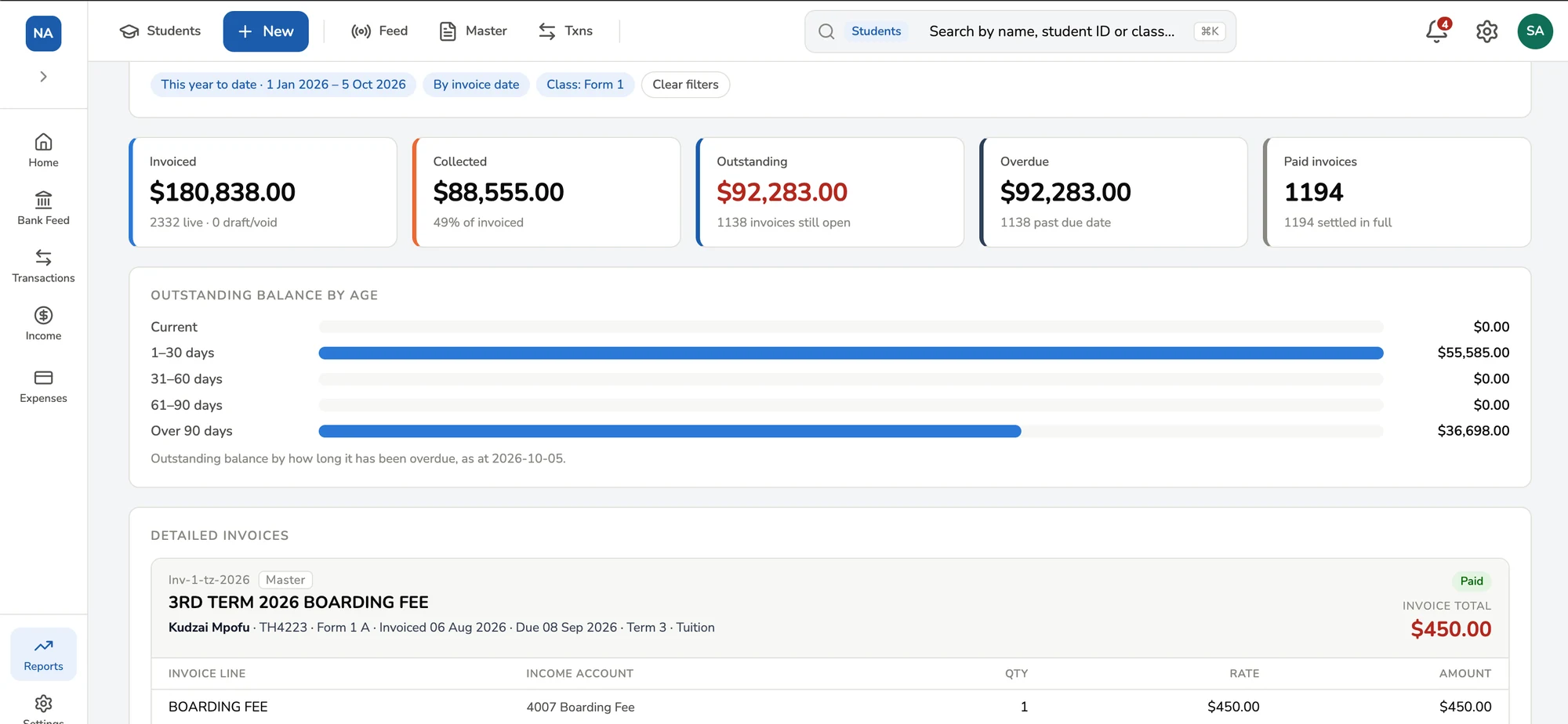
NuPay Invoice Report filtered to this year to date and class Form 1: invoiced, collected, outstanding and overdue totals, outstanding balance by age, and a detailed invoice.
The Invoice Report filtered to one class for the year to date.
Built from the live ledger

Numbers that agree with each other

There is no month-end export and no separate reporting database. Every report reads the same ledger the transactions were posted to, so two reports can’t disagree.

  • Always current. A payment posted at 09:14 is in the Profit & Loss at 09:14.
  • Reconciled to the control accounts. A/R ageing is checked live against Accounts Receivable, and student credits against the credits account. A banner appears if they ever disagree.
  • Honest about edge cases. Invoices with no due date are counted as current and flagged, not assumed overdue. Drafts and voided invoices are excluded.
  • Historical rates frozen. A past transaction is never restated at today’s exchange rate.
  • A trail behind every figure. Drill from a total to the entry, and from the entry to who posted it and when.
The A/R Ageing Summary in NuPay, drilled into one student to show each overdue invoice with its due date and days overdue.
The A/R Ageing Summary in NuPay, drilled into one student: each invoice, its due date and how many days overdue.
Who reads them

The right report for the board, the auditor and the bursar

And more

Over thirty, and counting

  • Fees Balances
  • Budget Vs Actuals
  • Balance Sheet
  • AR Aging Summary
  • Students Credits
  • General Ledger
  • Account Transactions
  • Profit and loss
  • Activity logs and Audit Trail
  • Expense Details
  • Journal Report
  • Interbank Transfers Reports
  • Trial Balance
  • Cash Flow Statement
  • +30 more reports

FAQs

Which reports are included on each plan?

NuPay Start includes essential reports such as the General Ledger, Balance Sheet, Trial Balance, Profit & Loss, Cash Flow Statement, Fees Statements, Expenses and Invoice Reports. Pro and Complete add Budget vs Actuals, Journal Entries, Activity & Audit Trail, Interbank Transfers and 20+ additional reports.

Can I run the Profit & Loss on a cash basis?

Yes. The Profit & Loss switches between accrual basis, where income counts when invoiced, and cash basis, where it counts when paid. The currency options follow the basis you choose.

Do I have to close the month before I can report?

No. Every report reads the live ledger, so you can open a statement at any moment and it is already up to date. A month is closed by locking the period, not by compiling a report.

Can I see where a figure came from?

Yes. Click a figure on a statement to see the accounts behind it, then the entries, then the source document. The Activity & Audit Trail shows who posted it and when.

Can reports be filtered by department?

Yes. Department is a filter on every major report, so you can see one department’s income, spending or budget on its own.

Can I export reports?

Yes. Every report exports to CSV for the board, the auditors or your own spreadsheet.
How does multi-currency affect the reports?

Reports can be filtered by currency. Each transaction is kept at the rate approved for its own date, so past figures are never restated at today’s rate.

The board pack, before the board asks

See a Profit & Loss, a Balance Sheet and an A/R ageing come straight off the ledger, with nothing to compile.