Fee Allocation

Every payment, placed on the right invoice.

When money comes in, NuPay works out which student it belongs to and which invoices it settles. Full payments, part payments and overpayments are all allocated for you, and balances update straight away.

  • Payments allocated to the right student and invoice
  • Part payments and credits tracked automatically
  • Balances always up to date
What it handles

However parents pay, it lands in the right place

Parents rarely pay the exact invoice, on the exact day, with a perfect reference. NuPay allocates the payment anyway.

NuPay Intelligence

It suggests the match. You stay in control.

NuPay Intelligence reads the transaction, proposes the student and the invoices, and shows its reasoning.

  • Online payments come through the gateway API with the invoice already attached. For everything else, matching looks at bank references, student details, open invoices and payment patterns.
  • See why a match was made, such as name, class and exact amount.
  • Tick the invoices to settle and adjust the amounts if you need to.
  • Save as a draft, post it, or post and move straight to the next one.
Balances

Balances that update themselves

As soon as a payment is allocated, everyone sees the same, current number.

  • See paid, partially paid and outstanding balances instantly, without chasing spreadsheets.
  • Parents see what they still owe and can pay the rest online.
  • Balances and fee status flow back to NuClass automatically.
  • Every allocation posts to the ledger, so statements and reports stay current.
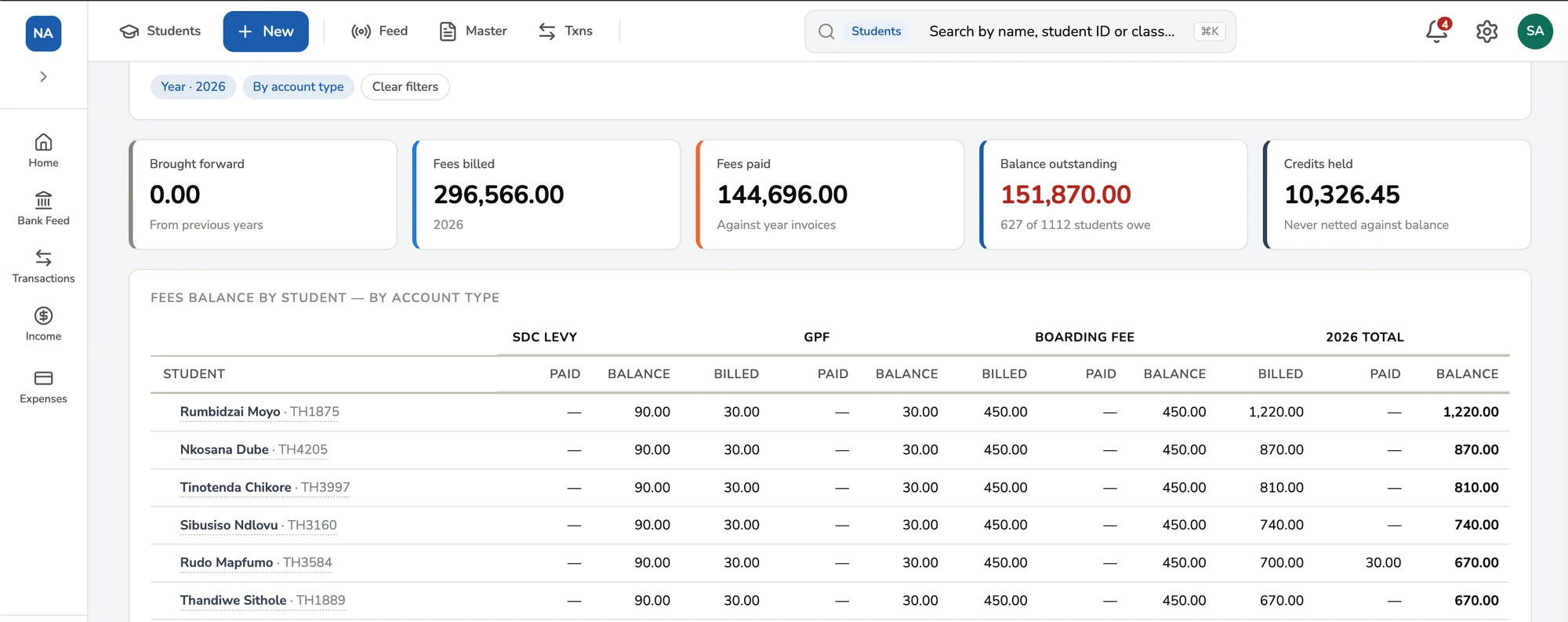
NuPay Fees Balance report for 2026: fees billed, fees paid, balance outstanding and credits held, with each student’s billed, paid and balance amounts by fee type.
The Fees Balance report: what each student was billed, has paid and still owes, by fee type.
How it works

From payment to allocated, in four steps

  1. 1

    A payment arrives

    It comes in online, through the bank feed, or is captured as cash or swipe.

  2. 2

    NuPay finds the student

    The reference, amount and student details point to the right account.

  3. 3

    Invoices are settled

    The payment is allocated to the invoices it covers, in full or in part.

  4. 4

    Balances update

    The student’s balance, the portal and the books all change together.

FAQs

What is fee allocation?

Fee allocation is how a payment gets applied to a student’s invoices. NuPay works out which student a payment belongs to and which invoices it settles, then updates the balances and the books.

What happens if a parent pays less than the invoice?

The payment is allocated to the invoice, which is marked as partially paid. The outstanding balance stays visible to the school and the parent until it is settled.

What happens if a parent pays too much?

The amount above what is owed is kept as student credit, ready to be applied to a later invoice.

Can one payment cover several invoices?

Yes. A single payment can be allocated across school fees, levies, trips, exam charges and other invoices for the same student.

Can we review an allocation before it is posted?

Yes. You can see the suggested student and invoices, adjust the amounts, and save the allocation as a draft or post it.

Know exactly who has paid, and for what

See NuPay allocate real payments to students and invoices, with balances updating as it goes.