Bank Feeds

Your bank statement, already in your books.

Connect the school’s bank accounts and transactions flow into NuPay automatically. Deposits are matched to students and invoices, expenses are categorised, and the books reconcile without anyone re-typing a statement.

  • No statement exports or manual capture
  • Deposits matched to the right student and invoice
  • Expenses posted to the right account and department

Connected banks

A live link to the school’s bank

NuPay is integrated with ZB Bank by API for live bank feeds, so every account the school runs there shows up in one place, and with the payment gateway for online payments.

ZB BankLive bank feed · SDC, tuition and other school accounts Connected

Bank with someone else? Integration availability depends on your financial institution. See bank connections.

How it works

From the bank to the books, by itself

  1. 1

    Connect the account

    Link the school’s bank accounts to NuPay once.

  2. 2

    Transactions flow in

    Bank transactions arrive in NuPay without anyone exporting a statement.

  3. 3

    NuPay sorts them

    References, amounts and student names are matched. Expenses are categorised.

  4. 4

    The books reconcile

    Every transaction posts to the ledger, so bank and books stay in step.

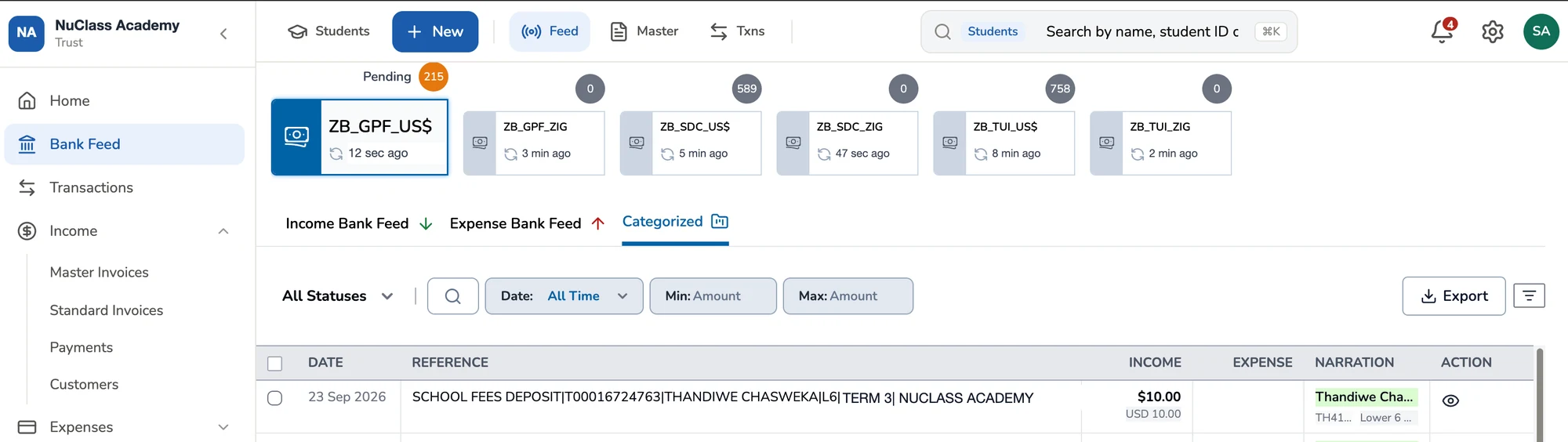
NuPay Bank Feed screen: six ZB Bank accounts in USD and ZWG with pending counts and last-synced times, and a categorised deposit matched to a student.
The bank feed in NuPay: each of the school’s accounts, when it last synced, and deposits matched to students.
Money in

Every deposit finds its student

A bank reference like “SCHOOL FEES DEPOSIT PRINCE MLAMBO 1A” is all NuPay needs.

  • NuPay reads the reference, finds the student and settles the invoice.
  • Matching looks at bank references, student details, open invoices and payment patterns.
  • Balances and fee status update as soon as the payment is allocated.
  • Anything unclear is queued with suggestions, never guessed.
Money out

Expenses that categorise themselves

The same feed that brings in fees also shows where school money is going.

  • Expenses from your bank feeds are categorised and turned into accurate accounting records.
  • Each one is allocated to the right vendor, expense account and department.
  • Every expense posts to the ledger automatically, with a full audit trail.
  • See what has been paid and what is still outstanding as it happens.

FAQs

What are NuPay Live Bank Feeds?

Live bank feeds bring the school’s bank transactions into NuPay automatically, so deposits can be matched to students and invoices and the books reconciled without re-typing statements.

Which banks does NuPay connect to?

NuPay is integrated with ZB Bank by API for live bank feeds, and with the payment gateway for online payments by EcoCash, card and bank transfer. Integration availability may depend on the financial institution your school uses, so talk to us about your bank.

Does NuPay hold or move the school’s money?

No. The money stays in the school’s own bank account. NuPay reads the transactions to match, allocate and reconcile them, and never holds the school’s funds.

Are Bank Feeds included in all plans?

Yes. All NuPay plans include Bank Feeds, allowing supported bank transactions to flow into NuPay for reconciliation and bookkeeping.

What happens to a transaction NuPay can’t match?

It is queued for review with suggestions, so your bursar can confirm the right student, invoice or expense account. Nothing is guessed.

Stop re-typing bank statements

See a live bank feed match deposits, categorise expenses and reconcile the books.